
-
×
 Solar Mounting Aluminium Rail 5 meters
KSh 5,568.00 (incl. tax)
Solar Mounting Aluminium Rail 5 meters
KSh 5,568.00 (incl. tax) -
×
 Yeastar P560 VoIP PBX
KSh 110,200.00 (incl. tax)
Yeastar P560 VoIP PBX
KSh 110,200.00 (incl. tax)
Yeastar IP PBX Systems in Kenya – Flexible VoIP for Growing Businesses
Take your business communication to the next level with Yeastar IP PBX Systems—designed for performance, scalability, and security. Whether you’re managing an office team or supporting remote staff, Yeastar delivers smart VoIP solutions that adapt to your needs.
From Yeastar Expansion Boards to PBX Modules, VoIP Gateways, and GSU Gateways, we offer a complete ecosystem of products that grow with your business. With support for unified communications, SIP trunking, IP phones, and remote access, Yeastar makes it easy to centralize and future-proof your communication infrastructure.
Sale!

Yeastar VoIP Gateway
Original price was: KSh 104,000.00.KSh 95,000.00Current price is: KSh 95,000.00. Ex.VAT

Yeastar VoIP PBX Modules
EX08 – Yeastar Expansion Board w/ 8 RJ11 Ports for S100 and S300
KSh 8,299.00 Ex.VAT

Sale!

Yeastar VoIP PBX Modules
Original price was: KSh 27,500.00.KSh 25,500.00Current price is: KSh 25,500.00. Ex.VAT


Sale!
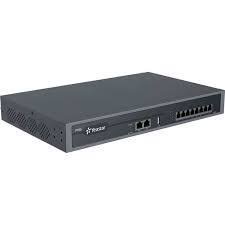
Yeastar P-Series PBX System
Original price was: KSh 75,500.00.KSh 65,500.00Current price is: KSh 65,500.00. Ex.VAT
Sale!
Yeastar P-Series PBX System
Original price was: KSh 97,500.00.KSh 95,000.00Current price is: KSh 95,000.00. Ex.VAT
Sale!

Yeastar P-Series PBX System
Original price was: KSh 232,000.00.KSh 220,000.00Current price is: KSh 220,000.00. Ex.VAT
Sale!

Yeastar S-Series PBX
Original price was: KSh 37,000.00.KSh 29,000.00Current price is: KSh 29,000.00. Ex.VAT
Sale!

Yeastar S-Series PBX
Original price was: KSh 63,000.00.KSh 58,000.00Current price is: KSh 58,000.00. Ex.VAT
Why Choose Yeastar?
- Scalable Setup – Add users and features easily with plug-and-play modules.
- Unified Communication – Enjoy voice, video, voicemail, presence, and mobility tools.
- Remote Work Support – Enable mobile apps and remote extensions with ease.
- Smooth Integration – Works with analog lines, IP networks, and SIP platforms.
- Affordable Excellence – Get enterprise-grade performance at competitive prices in Kenya.
Our Product Line Includes:
- Yeastar IP PBX Systems – Reliable solutions for SMBs and enterprises.
- Yeastar Expansion Boards – Add analog/digital ports or GSM/4G connectivity.
- Yeastar GSU Gateways – Bridge legacy systems to VoIP networks.
- PBX Modules & VoIP Gateways – Customize, expand, and connect with flexibility.
Common FAQsCan MyPBX support unified communications and remote working? Yes, MyPBX supports features like video, voicemail, presence, and mobile extensions for remote connectivity.
How do I secure MyPBX from attacks and fraud? Use strong passwords, disable unused services, update firmware, and enable SIP firewall rules.
How can I change the default IP address of MyPBX? Access System > Network Settings in the web interface and assign a new IP that matches your network.
What if my PC and MyPBX are in different or same network segments?
- Different segments: Configure routing or use a VPN.
- Same segment: Access MyPBX directly using its IP via a browser.
Why Choose Us as Your Yeastar Partner in Kenya?
- Official Yeastar Distributor – 100% genuine products
- Local Warranty & Technical Support – We’ve got your back
- Fast Nationwide Delivery – Prompt and reliable
- Expert Guidance – We match solutions to your business needs