
Sale!
Original price was: KSh 30,000.00.KSh 26,500.00Current price is: KSh 26,500.00. Ex.VAT
Original price was: KSh 30,000.00.KSh 26,500.00Current price is: KSh 26,500.00. Ex.VAT
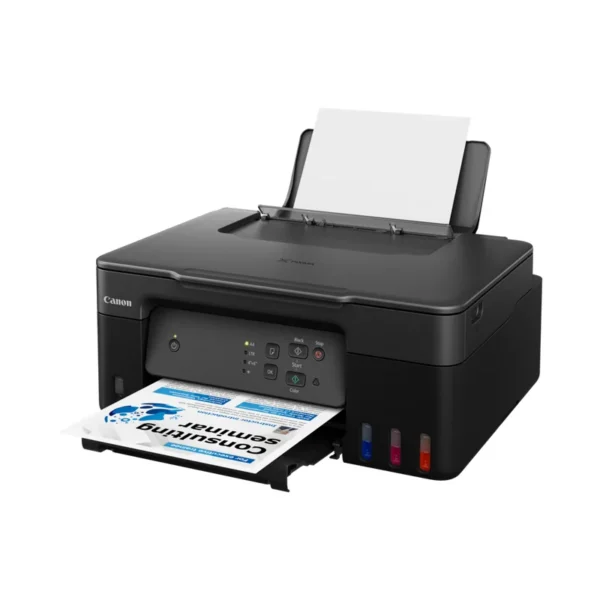
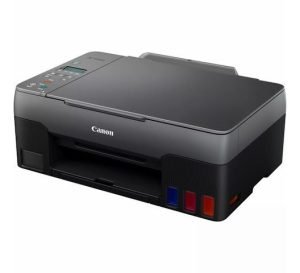
Canon PIXMA G2430 Inkjet A4 4800 x 1200 DPI
The Canon PIXMA G2430 is an all-in-one inkjet printer designed for high-volume printing, scanning, and copying.
With its innovative refillable ink tank system, this printer delivers outstanding cost-efficiency and exceptional print quality. Perfect for home offices or small businesses, the PIXMA G2430 combines performance with convenience, making it easy to handle various printing tasks.
Specifications
Printer
Paper Support
Scanner
Copier
Interface
Software
Physical Features
Cartridges and Yields
Features
Achieve substantial printing at low costs with yields of up to 12,000 pages (26% more in Economy mode). This printer is designed to handle large print jobs economically.
Enjoy high-quality prints with speeds of up to 10.8 ipm for black and 5.0 ipm for color. The printer employs pigment black ink for sharp text and dye-based inks for vibrant color photos.
Reduce downtime with a user-replaceable maintenance cartridge that ensures consistent performance, allowing you to meet your printing demands with ease.
Refill ink tanks effortlessly using non-squeeze bottles with unique key type nozzles, ensuring that each ink bottle can only refill its corresponding tank.
Utilize the Canon PRINT app and PIXMA Cloud Link for seamless printing, scanning, and copying. Enjoy direct connections with smart devices via AirPrint (iOS) and Mopria (Android).
Common FAQs
Is Canon PIXMA G2430 a laser or inkjet printer?
The Canon PIXMA G2430 is an inkjet printer. It uses a refillable ink tank system, making it suitable for high-volume printing at lower costs compared to laser printers.
What does PIXMA mean on a printer?
PIXMA is Canon’s brand name for its line of inkjet printers. The name reflects Canon’s commitment to innovative printing technology, offering quality and convenience for various printing needs.
How long do Canon inkjet printers last?
The lifespan of a Canon inkjet printer can vary based on usage and maintenance, but with proper care, many models can last several years. Regularly replacing ink and keeping the printer clean can help prolong its life.
How do I know if my Canon printer is inkjet?
You can determine if your Canon printer is an inkjet by checking the model specifications. Inkjet printers typically use ink cartridges or refillable tanks for printing, while laser printers use toner cartridges. Additionally, you can look for “PIXMA” in the model name, which indicates it’s part of Canon’s inkjet line.
Discover the latest Canon printer prices in Nairobi, Kenya, at TDK Solutions, featuring options like the Canon PIXMA, Canon imageCLASS, Canon PIXMA Pro, and Canon MAXIFY.
Whether you need a printer for documents, photos, or labels, we have you covered. Consider factors such as print type, speed, connectivity, and cost to choose the right printer for your home or office. Enhance your printing experience with our competitive prices and expert guidance.
 Epson L850 Photo All-in-One Ink Tank Printer
KSh 70,500.00 Ex.VAT
Epson L850 Photo All-in-One Ink Tank Printer
KSh 70,500.00 Ex.VAT Ink Cart Epson T6735 Light Cyan -70ml
KSh 2,650.00 Ex.VAT
Ink Cart Epson T6735 Light Cyan -70ml
KSh 2,650.00 Ex.VAT Patch Cords, Dlink, TPlink, HST 5 meter
KSh 750.00 Ex.VAT
Patch Cords, Dlink, TPlink, HST 5 meter
KSh 750.00 Ex.VAT HP Laser 107A (A4) Mono Laser Printer-Print Only
Original price was: KSh 25,000.00.KSh 23,700.00Current price is: KSh 23,700.00. Ex.VAT
HP Laser 107A (A4) Mono Laser Printer-Print Only
Original price was: KSh 25,000.00.KSh 23,700.00Current price is: KSh 23,700.00. Ex.VAT Epson T6732 Cyan Ink Cartridge - 70ml
KSh 2,650.00 Ex.VAT
Epson T6732 Cyan Ink Cartridge - 70ml
KSh 2,650.00 Ex.VAT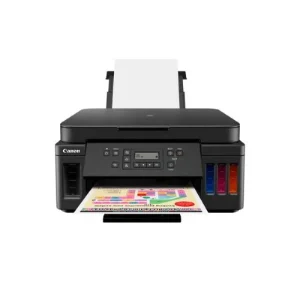
Canon Printers

Canon Printers

Canon Printers
Canon Printers
Canon Printers

Canon Printers

Canon Printers
Canon Printers
Lorem ipsum dolor sit amet, consectetur adipiscing elit. Quisque pretium mollis ex, vel interdum augue [...]
4 Comments
Lorem ipsum dolor sit amet, consectetur adipiscing elit. Quisque pretium mollis ex, vel interdum augue [...]

Lorem ipsum dolor sit amet, consectetur adipiscing elit. Quisque pretium mollis ex, vel interdum augue [...]
It's estimated that more than 5 billion people have mobile devices, which represents approximately 94% [...]
Lorem ipsum dolor sit amet, consectetur adipiscing elit. Quisque pretium mollis ex, vel interdum augue [...]

Lorem ipsum dolor sit amet, consectetur adipiscing elit. Quisque pretium mollis ex, vel interdum augue [...]

Lorem ipsum dolor sit amet, consectetur adipiscing elit. Quisque pretium mollis ex, vel interdum augue [...]