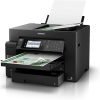
HP OfficeJet Pro 9013 All-in-One Printer
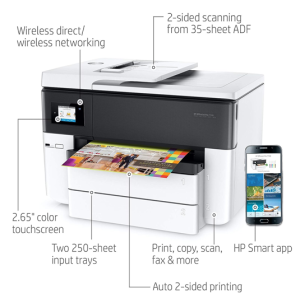
HP OfficeJet Pro 9013 All-in-One Printer is designed for small businesses and home offices, combining fast printing, scanning, copying, and faxing capabilities in a compact and efficient device.
With wireless connectivity and smart features, this printer helps you streamline your workflow and increase productivity.
Specifications
- Functions: Print, Copy, Scan, Fax
- Print Speed: Up to 22 ppm (black), up to 18 ppm (color)
- First Page Out: As fast as 10 seconds (black)
- Print Quality: Up to 4800 x 1200 optimized dpi
- Display: 2.65-inch color touchscreen
- Duplex Printing: Automatic
- Monthly Duty Cycle: Up to 30,000 pages
- Recommended Monthly Page Volume: 400 to 800 pages
- Connectivity:
- 1 Hi-Speed USB 2.0
- Ethernet
- Wireless (802.11b/g/n)
- Wi-Fi Direct
- Paper Handling Input: 250-sheet input tray, 35-sheet ADF
- Weight: 5.09 kg
Features
- All-in-One Functionality: Print, copy, scan, and fax all from one compact device, making it ideal for diverse office tasks.
- Fast Printing Speeds: Enjoy fast print speeds of up to 22 pages per minute for black and 18 pages per minute for color, ensuring you stay productive.
- High Print Quality: With optimized resolutions up to 4800 x 1200 dpi, your documents will look sharp and professional.
- Smart Mobile Printing: Easily print from your mobile devices using the HP Smart app, Apple AirPrint, and Google Cloud Print.
- Automatic Duplexing: Save paper and time with automatic double-sided printing.
- Easy Setup and Management: The intuitive touchscreen display makes setup and navigation a breeze.
Common FAQs
- What types of paper can the HP OfficeJet Pro 9013 print on?
- This printer can handle various media types, including plain paper, glossy photo paper, and envelopes.
- Can I print wirelessly with this printer?
- Yes, the OfficeJet Pro 9013 supports wireless printing via Wi-Fi and mobile printing solutions.
- How do I replace the ink cartridges?
- Ink cartridges can be easily replaced by opening the front access door and following the prompts on the touchscreen.
- What is the recommended monthly page volume for the printer?
- The recommended monthly page volume is between 400 to 800 pages, making it suitable for small business use.
Discover the latest HP printer prices in Nairobi, Kenya, at TDK Solutions, featuring a wide range of options like HP LaserJet, HP OfficeJet, HP DeskJet, HP Neverstop and HP Smart Tank series.
Whether you need a printer for everyday documents, vibrant photos, or professional-quality labels, we have the perfect solution for you. Enhance your printing experience with our competitive prices and expert guidance, ensuring you find the right HP printer to meet your needs!

 Hp Color Laserjet 283fdn Printer
KSh 86,536.00 (incl. tax)
Hp Color Laserjet 283fdn Printer
KSh 86,536.00 (incl. tax) Hp Color Laserjet 479fdn Printer
KSh 119,480.00 (incl. tax)
Hp Color Laserjet 479fdn Printer
KSh 119,480.00 (incl. tax)